Demand Generation's Next Job is Orchestrating the Signals Behind Pipeline
Read More

AI is quickly becoming part of marketers’ daily workflows. Teams are drafting briefs in ChatGPT, analyzing ideas in Claude, and building automations in AI-native workflow tools.
But there’s one catch: AI systems are only as useful as the data and tools they can access. If your advertising platform is disconnected from the AI environments where your team is already working, then campaign performance, account insights, and execution workflows still require manual exports, dashboard switching, or one-off integrations.
That’s where Model Context Protocol (MCP) comes in.
The AdRoll MCP server helps close this gap by allowing AI assistants, agents, and MCP-compatible clients to securely connect to supported AdRoll data and tools. This makes it possible to bring AdRoll campaign performance, draft-first campaign workflows, and AdRoll ABM account intelligence into the AI and automation environments your team already uses.
Model Context Protocol, or MCP, is an open standard that gives AI systems a consistent way to connect external platforms to data sources and tools.
Instead of building a custom integration between every AI client and every business platform, MCP provides a shared connection layer. Through MCP, compatible clients can retrieve structured data, invoke supported tools, and use live platform context when responding to a request or completing a workflow.
Put simply: MCP helps AI systems move beyond static responses by giving them a secure, permissioned way to work with real business systems.
The AdRoll MCP server is AdRoll’s MCP-compatible connection layer. It exposes supported AdRoll data and tools to external AI systems and MCP-compatible clients through a secure, permissioned interface.
Once connected, a client such as ChatGPT, Claude, Cursor, n8n, or Microsoft Copilot Studio can use the AdRoll MCP server to retrieve AdRoll data or invoke supported AdRoll tools based on the authenticated user’s permissions.
For example, a connected client may be able to:
Retrieve campaign performance and reporting data
Analyze trends and summarize changes over time
Help create new campaign drafts
Support selected campaign management workflows
Surface AdRoll ABM account intelligence
Help prioritize accounts for sales or marketing follow-up
This does not replace the AdRoll platform or the AdRoll AI Assistant. Instead, it extends supported AdRoll data and tools into the external AI and automation workflows where teams are increasingly doing their work.
The AdRoll MCP server is designed for teams that want to connect AdRoll to the AI assistants, agents, and MCP-compatible clients they already use.
It may be useful for:
Hands-on marketers who want to check performance, review trends, create campaign drafts, or manage supported campaign workflows without switching between tools.
Agencies that manage multiple accounts and want faster access to reporting and campaign insights across client workflows.
ABM and demand generation teams that want to explore account intelligence, identify high-intent accounts, and prioritize follow-up.
Sales teams with AdRoll ABM access that want to better understand account activity and prepare more relevant outreach.
Marketing operations and technical teams that want to connect AdRoll into AI workflows, automations, or MCP-compatible platforms such as n8n or Microsoft Copilot Studio.
The MCP server complements the AdRoll UI and APIs by making AdRoll accessible through AI-native interaction patterns, including natural language prompts, agent workflows, and connected automations.
Advertising and ABM workflows are often spread across campaign dashboards, analytics tools, CRM systems, creative platforms, and internal reporting processes. Even when the data exists, getting it into the right workflow can still require manual exports, spreadsheet work, or repeated platform switching.
MCP helps address this by making business systems more accessible to AI agents, assistants, and compatible clients.
For advertising and ABM teams, that has three major implications.
Marketers should not have to leave the AI workflow they are already using every time they need to check campaign performance, review account activity, or create a campaign draft.
With MCP, AdRoll can become available inside external AI and automation environments, reducing the need to manually move between systems.
AI agents and automations are only as effective as the systems they can reach. If your campaign platform is not connected, the workflow is incomplete.
By exposing supported AdRoll data and tools through MCP, teams can bring campaign performance, campaign management workflows, and ABM account intelligence into broader AI-driven processes.
Because MCP is an open standard, it supports a growing ecosystem of compatible clients and platforms. This helps reduce the need for one-off integrations and creates a more flexible foundation for future AI workflows.
Over time, as standards like MCP and agent-to-agent communication continue to develop, teams will be able to coordinate more work across systems. That opens the door to AI workflows that do more than summarize data. They can help teams analyze, prioritize, draft, and act across connected platforms.
The AdRoll MCP server supports several workflows across AdRoll and AdRoll ABM.
Campaign reporting is one of the most common ways marketers can use MCP.
Instead of exporting data or building a report manually, teams can ask natural language questions and retrieve performance information from AdRoll.
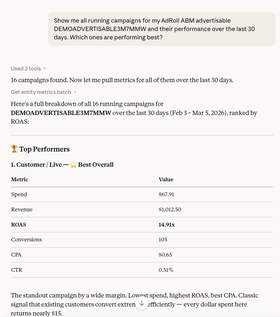
Example prompts:
“Show performance for the last 30 days.”
“Which campaigns had the biggest week-over-week change in conversions?”
“What changed in performance this week?”
“Summarize performance trends across my active campaigns.”
With MCP, the connected client can retrieve live campaign data and return a structured response, helping marketers get to insight faster.
For teams managing multiple campaigns or accounts, this can reduce time spent assembling reports and increase time spent interpreting results and deciding what to do next.
MCP can also support campaign creation and selected campaign management workflows.
For new campaigns, the AdRoll MCP server is designed to support draft-first creation. That means new campaigns created through MCP are staged for review before going live, helping marketers stay in control of campaign decisions and spend.
Example prompts:
“Create a retargeting campaign draft targeting high intent visitors.”
“Create a new campaign draft based on this campaign brief.”
“Help me identify campaigns where budget or pacing should be reviewed.”
“Show me campaigns that may need optimization.”
This helps teams move from insight to action more efficiently. A marketer might review performance, identify an opportunity, and create a draft campaign or supported campaign update from the same AI workflow.
Supported write capabilities depend on the user’s AdRoll permissions and may vary during beta.
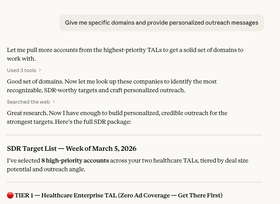
For AdRoll ABM users, MCP can help sales and marketing teams explore account intelligence and prioritize follow-up.
ABM teams often need to review intent signals, engagement activity, and campaign status before deciding which accounts to target or send to sales. MCP makes those workflows easier to access through natural language.
Example prompts:
“Which accounts have shown the highest intent activity recently?”
“Which accounts should our SDR team prioritize?”
“Are there any high-intent accounts we haven’t targeted yet?”
“Help me draft outreach for top engaged accounts.”
This is especially useful for demand generation, ABM, and sales teams that want to connect account intelligence to action. Marketing teams can identify target accounts for campaigns, while SDRs with the right permissions can use account activity to support more relevant outreach.
The future of advertising and ABM will not be limited to a single dashboard or a single AI assistant. Teams are already working across AI assistants, agent platforms, automation tools, CRMs, analytics systems, and campaign platforms.
The AdRoll MCP server helps make AdRoll part of that connected ecosystem.
By exposing supported AdRoll data and tools through a secure, open standard, MCP helps teams bring campaign performance, draft-first campaign workflows, and ABM account intelligence into the AI environments where work is increasingly happening.
AdRoll MCP is currently available in beta. To get started, visit the AdRoll MCP Server Help Center article for setup details and supported client instructions.
Last updated on May 27th, 2026.